Can You Use an iPhone as a Teleprompter?
A Simple Setup That Actually Works Yes, you can use an iPhone as a teleprompter, and for a


There is a strange little gap in a lot of creator workflows.
You record the thing. The words land well enough. The delivery has the right energy. Nothing has fallen over, the phone is still alive, and the dog has not started performing jazz percussion in the next room. Wonderful. Then the actual work continues somewhere else. Now the recording needs captions. Maybe a logo. Maybe a quick check before it gets saved, shared or sent to someone. Suddenly the simple session becomes a relay race between apps, exports, camera roll hunting, editing tools and that low-level dread of ruining a take that was already good enough to use.
That is the gap Creator Suite is built for in Vibe Cue. Not as a replacement for a full editing suite. Nobody is pretending an iPhone teleprompter should become a sprawling post-production bunker. Creator Suite is for the practical moment after recording, when the session is done and you want to get it into a more useful, share-ready state without dragging the whole workflow through a different piece of software. Because sometimes the best edit is not a grand edit.
Sometimes it is just the handful of finishing touches that help a video leave the building.
A lot of creator tools focus on capture. That makes sense. Recording is the obvious centre of the experience. But anyone who makes content regularly knows the real friction often arrives after the take.
You have a usable recording, but it is not quite ready. Maybe it needs captions so it works better on social feeds where half the audience is watching silently. Maybe it needs a subtle brand mark because it is going out as business content. Maybe you want to check how the captions actually sit over the video before committing to a full export.
That is a different kind of workflow from traditional editing. It is not about building a film. It is about finishing a session cleanly. Creator Suite is designed around that smaller, sharper job. It gives creators a place to add the essentials after recording, then save or send the result without turning the phone into a tiny production office with bad filing.
Captions have become one of those features people talk about as if they are cosmetic. They are not. They are practical.
People watch video without sound. People skim. People catch videos in noisy rooms, on trains, in offices, between meetings, in bed while pretending they are absolutely not still working. Captions help the message survive those conditions. For creators, captions also make the content feel more deliberate. A spoken line becomes easier to follow. A key phrase lands with more weight. A product explanation becomes less dependent on perfect audio and perfect attention, which is useful because the internet is not known for handing out perfect attention in generous portions. In Vibe Cue, Creator Suite can generate captions from the script and cue timing. That is important because the captions are not being treated as a random afterthought. They are connected to the session you just recorded. If your take follows the script closely, the app has a meaningful structure to work from.
And when it does not quite line up, that is where editing comes in.
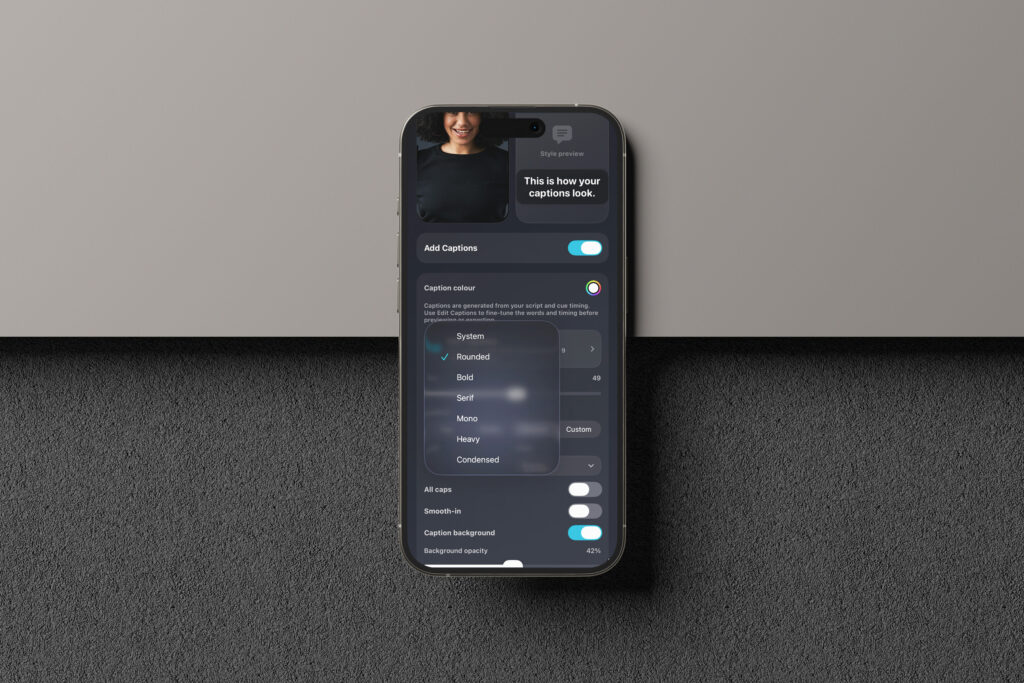
No creator wants to export a video, spot one weird caption, then start the whole circus again. Creator Suite includes caption editing so the words and timing can be adjusted before previewing or exporting. That is the sensible place to put the fix: after the recording, before the final output.
It means you can tidy a phrase, patch a missed line, adjust a start or end time and keep moving. The point is not to turn captioning into another complex job. It is to give creators enough control to avoid publishing something that feels careless. Style controls help for the same reason. Size, position, colour, alignment, all caps, smooth-in and background opacity are not there so people can spend forty minutes auditioning fonts like a haunted menu designer. They are there because videos are not all the same. A caption that works on a clean studio wall might disappear against a busy room. A bottom caption may clash with a person’s hands, a product, a lower-third graphic or platform controls. Sometimes the caption needs a background. Sometimes it needs to sit higher. Sometimes it needs to be bigger because the video will mostly be watched on a phone, inside another app, at the speed of modern impatience.
The controls are practical. They help the video survive the real world.
Creator Suite also includes a logo overlay. Used well, that is enough.
There is a temptation with brand marks to stamp the video like a customs form. Bigger, louder, more visible, more “we definitely own this.” That usually makes the work feel cheaper. A good logo overlay should do its job without elbowing the content out of the frame.
Vibe Cue lets you add a small logo, place it sensibly and control its size and opacity. The reason is simple: creators, small businesses, educators and teams often need content that looks like it belongs to them, even when it was made quickly. A subtle logo helps maintain ownership and consistency. It can make a quick recording feel more finished without pretending it was made in a studio with three assistants and a sandwich budget. Again, this is where Creator Suite fits best. It gives the video enough polish to be useful without turning the process into a branding ceremony.
One of the smartest habits in any content workflow is checking a small version before committing to the full thing. Creator Suite’s preview playback is built around that idea. Instead of exporting the whole video just to discover the captions sit too low or the logo is sitting on someone’s face, you can render a short Creator sample first. Ten, twenty or thirty seconds is often enough to catch the obvious problems. That saves time. More importantly, it protects momentum.
Momentum is fragile in creator work. Once you have recorded something successfully, you do not want to tumble into a loop of exporting, checking, adjusting, exporting again and quietly becoming furniture. A short preview gives you a safer way to test the finish before you send the full video out into the world. It is a small thing, but small workflow protections matter.
Creator Suite also gives creators the option to save an original backup before exporting the polished Creator version.
That is not glamorous. It is not the kind of thing you put in giant hero text. But it is exactly the sort of feature that makes sense when you have actually made things under pressure. Sometimes the polished export is right. Sometimes, later on, you realise the clean original would be better for a different platform, a different edit, or another pass. Sometimes the captions need changing. Sometimes the logo choice was not ideal. Having the unburned recording saved as a fallback means the work stays safer.
The original take is the clay. The Creator version is the shaped piece. Both can have value.
The purpose of Creator Suite is not to make every Vibe Cue user into a video editor. It is to help creators finish the session they already started. Record. Review. Add captions if they help. Add a logo if it belongs. Preview the finish. Save or send it on. Keep a clean backup when needed. That is the useful loop.
For solo creators, it means less app-hopping. For small teams, it means faster turnaround. For educators, coaches, marketers and business owners, it means a recording can become a usable asset before the energy of the session goes cold. Vibe Cue is built around the idea that modern creation is often lean, mobile and slightly improvised. Creator Suite follows that same logic. It gives the recording just enough finishing power to leave the app in better shape than it entered. Not every session needs a full edit.
Some just need to get out the door properly.