
Welcome to
WordPress Power without The Plugin Pile-Up
Vibe Press Tools is A modular toolkit for WordPress and Elementor. Advanced forms, smarter content, WebP images, maintenance tools, short links, email delivery, WooCommerce utilities and more, all under one roof
Supercharge Discoverability with advance Elementor MCP Integration!
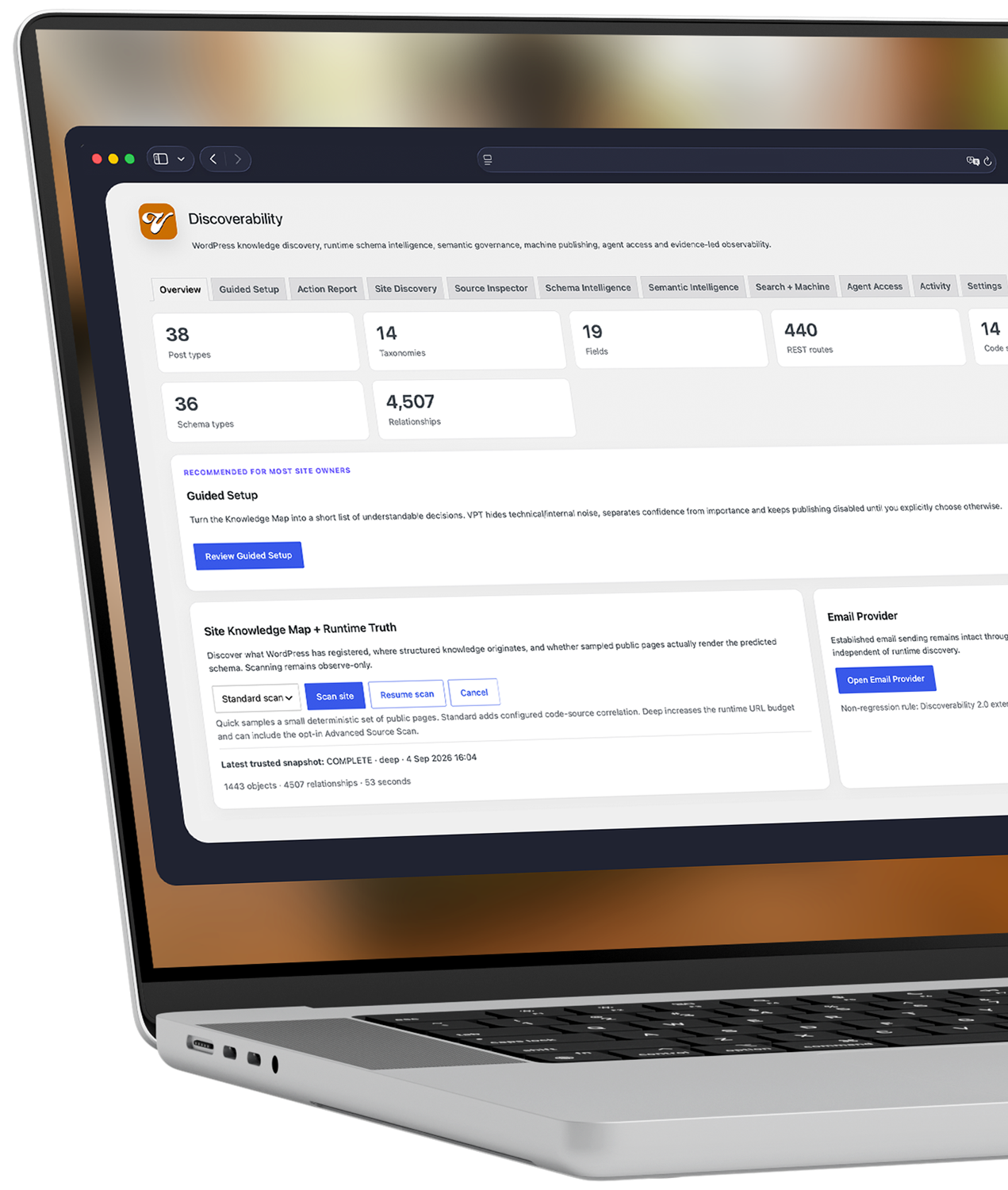
AI Website Discovery
Turn your WordPress site into something AI agents can actually explore. Vibe Press Tools combines Schema, llms.txt, Markdown and structured content mapping with a public, read-only MCP layer, letting compatible agents search your site, discover entities and relationships, and retrieve live information directly. Help search engines and AI agents properly understand your site. Publish structured discovery data and expose a public, read-only MCP layer for searching content, exploring entities and retrieving live Schema and Markdown.
Something a little different?
VibePlates
Render saved Elementor templates wherever you need them, using a fixed choice or dynamically selecting the template from SCF, ACF or post meta.
Reps & Ambassadors
Create Rep and Ambassador accounts, generate referral links, attribute WooCommerce sales, calculate commissions and build clear payout reports from inside WordPress.elationships to another platform.
Signup for Launch Announcements
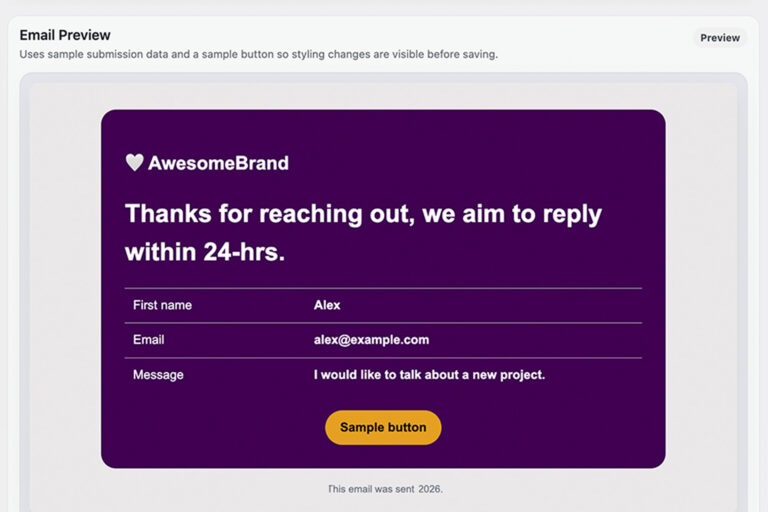
Email Templating
Forms do not have to email you like it is still 2007.
Build reusable email designs for Vibe Advanced Forms and apply them wherever they’re needed. Update the template once and every connected form stays consistent.
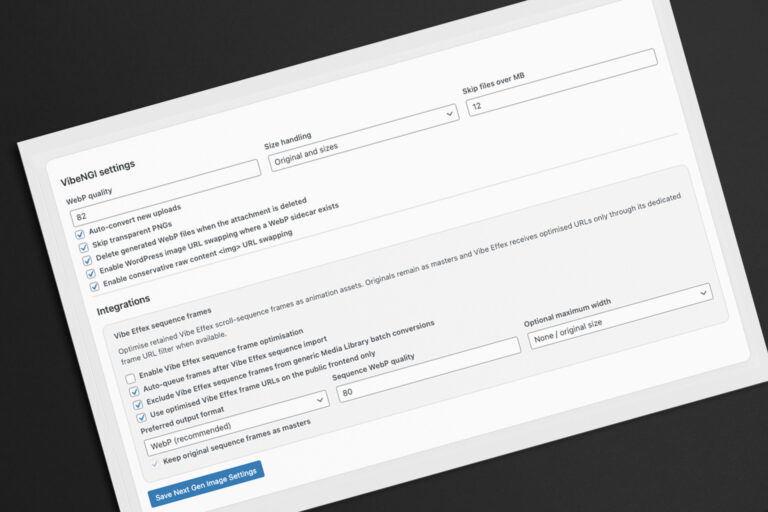
Next Gen Images
Smaller images. Originals untouched. Vibe Effex users can also optimise retained sequence frames!
Create WebP versions of Media Library images and serve them automatically while keeping every original intact. Batch conversion, configurable quality and reversible optimisation are built in.
Vibe Form Fields
Give Elementor Pro Forms some sharper tools.
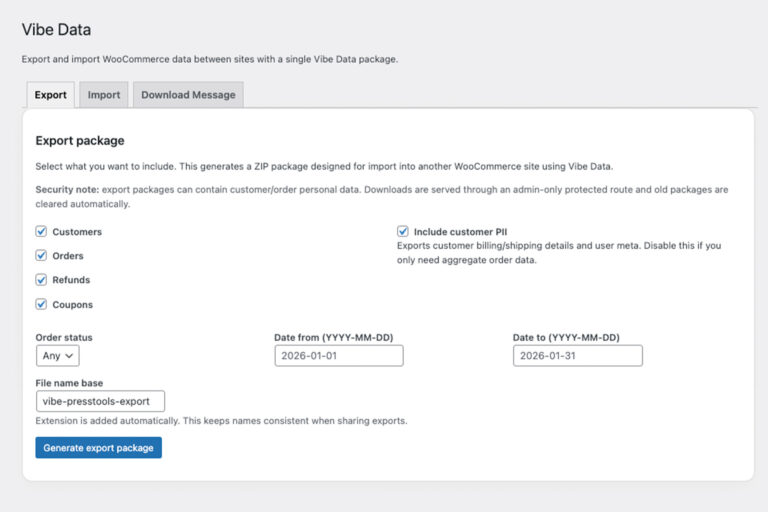
Vibe Data
Move WooCommerce data without the CSV rodeo.
Package selected customers, orders, refunds and coupons for controlled transfer between WordPress sites. Preview before importing, handle larger datasets in batches and keep sensitive customer data under your control.
Short Links
Your domain. Your links. Much less ugly.
Do you own a cool short domain name, put it to use!
Create memorable short URLs using your own website, redirect them to internal content and keep basic click counts. Perfect for campaigns, QR codes, social posts and anywhere a giant URL looks ridiculous.
Deliverability
Give WordPress mail a fighting chance.
Send WordPress mail through trusted SMTP providers, test connections and diagnose common delivery problems from one place. Includes presets for popular services plus custom SMTP support.
Signup for Launch Announcements!
Vibe Press Tools is built around modules rather than an all-or-nothing feature dump.
Need Advanced Forms but not WooCommerce Rep Sales? Fine. Need WebP conversion, Short Links and a Coming Soon screen? Switch those on instead.
The Vibe Press Tools hub keeps everything grouped into Building Tools, Functional Tools and Email tools so the plugin can grow without turning wp-admin into an aircraft cockpit.
No separate plugin for every five-minute problem. No collection of overlapping dashboards. No features running simply because they happened to arrive in the ZIP.
Switch on what you need. Ignore what you don’t.
Vibe Advanced Forms
Build powerful forms directly in Elementor with steps, groups, enhanced field types, conditional behaviour, saved submissions, private uploads, reusable email templates and flexible actions after submit.
Next-Gen Images
Generate reversible WebP versions of Media Library images and optionally serve them automatically on the front end. Originals stay untouched, because optimisation should not involve burning the lifeboats.
Plus soo much more..
One Toolkit. More WordPress.
Who is this for?
But wait there's more!
- Vibe Soon - Maintenance and coming-soon pages with role access, bypass links and URL allowlisting.
- Conditional Logic - Show, hide, enable or disable Elementor content and form fields using flexible conditions and saved post data.
- Admin UX - Quiet recurring third-party admin notices without hiding WordPress core updates or important system messages.
There’s More Under The Hood
Questions? Good. We Have Answers.
Vibe Press Tools is a modular toolkit for WordPress and Elementor that brings a collection of practical site-building, workflow and administration tools into one plugin.
Instead of installing a separate plugin every time you need a better form field, a maintenance screen, WebP conversion, SMTP routing, conditional content or a short URL, Vibe Press Tools gives those jobs one organised home.
The important bit is modular. You choose which tools the site needs and enable those modules from the Vibe Press Tools hub.
No. Quite the opposite.
Vibe Press Tools is designed so you can switch individual modules on and off from the central hub. A simple brochure site might use Advanced Forms, VibePlates and Next Gen Images, while a WooCommerce site might also enable Vibe Data and Rep Sales & Ambassadors.
You are not expected to configure everything simply because it came in the box.
It depends on which tools you want to use.
Vibe Press Tools includes WordPress-wide features such as Short Links, Vibe Soon, Deliverability, Next Gen Images, Vibe Data and Rep Sales & Ambassadors.
The Building Tools integrate with Elementor. Advanced Forms and VibePlates use Elementor, while Conditional Logic can work with standard Elementor elements and also enhance Elementor Pro Forms.
Vibe Form Fields specifically extends Elementor Pro Forms, so Elementor Pro is required for that module.
Vibe Advanced Forms is a dedicated Vibe Press Tools Elementor form widget built for workflows that have outgrown a basic contact form.
Alongside normal text, email, select, checkbox and upload fields, it supports richer controls including steps, grouped sections, choice cards, signatures, ratings, range sliders, locations, UTM capture and consent data.
The bigger difference is what happens afterwards. A form can send email, save a submission, redirect the visitor, trigger a webhook or perform supported WordPress account actions.
It is designed to be part of a workflow, not simply somewhere to put a Send button.
You can combine multiple actions depending on what the form needs to accomplish.
Vibe Advanced Forms can send an email, save the submission, redirect the visitor, send data to a webhook, log a user in, request a password reset or set a new password.
Saved entries can also be routed into custom submission groups.
Operational settings such as recipients, CC/BCC addresses, webhook credentials and external action settings are kept in protected server-side configuration rather than being printed into the public form HTML.
Vibe Form Fields expands the native Elementor Pro Form widget instead of asking you to rebuild existing forms in another system.
It adds richer field types including Location, Button Choice, Choice Cards, Signature, Rating, Range Slider, UTM Capture, Consent Timestamp and Hidden Context, plus Group Start and Group End controls for organising larger forms.
That makes it useful when an existing Elementor form needs to become more visual, structured or context-aware without abandoning Elementor's normal form workflow.
Conditional Logic lets Elementor content and supported form fields respond to rules.
You can show or hide elements, or enable and disable supported form fields, depending on whether defined conditions are met. Multiple conditions can be combined using AND or OR logic.
A rule can respond to another field on the page or form, making it useful for progressive forms, optional sections, product choices, enquiries and interfaces where showing everything at once would create unnecessary clutter.
Yes.
Conditional Logic includes a Current Post Field source that can read saved WordPress post meta from the content currently being viewed. That includes Secure Custom Fields field IDs and other standard post-meta keys.
This means one Elementor template can adapt itself to different posts, products or other content based on information already stored against them.
For current-post rules, the underlying meta key and comparison value are kept server-side. The front end receives an opaque rule reference and the resulting state rather than exposing the actual rule configuration in the page markup.
Yes. Vibe Advanced Forms can save submitted entries directly inside Vibe Press Tools.
You can review them in WordPress, organise them into custom routing groups such as Leads, Support, Marketing or Applications, and export selected records when you need to work with the data elsewhere.
Exports are available as CSV or JSON.
Vibe Press Tools also understands that not everything visually displayed inside a form is submission data. Presentational fields can be excluded automatically so saved records remain focused on the information the visitor actually supplied.
Advanced Form uploads can be stored in dedicated Vibe Press Tools private storage rather than being added to the normal WordPress Media Library.
Those files are only served through authorised admin routes, keeping documents, applications and private customer files away from the public Media Library workflow.
Administrators can review and delete protected uploads from the Submissions area, and an adjustable retention period can automatically remove files after they are no longer required while leaving the submission record itself intact.
Yes. Vibe Press Tools includes a reusable Email Template library for Vibe Advanced Forms. Build the layout and styling once, then select the appropriate template from each form.
Templates retain their identity even when renamed, and every installation includes a Default Template as a safe fallback. If a custom template being used by a form is later deleted, that form falls back to the Default Template.
Field tags can also be used to insert submitted values into email content and subjects.
Deliverability lets WordPress route its email through a chosen SMTP provider or supported hosting relay instead of relying entirely on the server's default mail configuration.
Vibe Press Tools includes presets for services such as Microsoft 365, GoDaddy Professional Email, GoDaddy cPanel Relay, common cPanel/Webmail, Brevo, SendGrid, Mailgun, Postmark and SMTP2GO, plus custom SMTP configuration.
You can run connection preflight checks, send test messages and inspect diagnostics from inside WordPress.
It improves your control over the sending route, but no plugin can guarantee that a message will reach a particular inbox. The receiving provider still gets the final vote.
VibePlates is a lightweight way to place saved Elementor templates inside another Elementor layout.
You can select a published local template directly, or let an SCF, ACF or other post-meta value provide the template ID dynamically.
That means one page template can contain a VibePlate while each individual post chooses what appears inside it.
It works well for reusable calls-to-action, product areas, banners, information panels and other blocks that need to vary without cloning the surrounding Elementor design.
No.
Next Gen Images creates separate WebP sidecar files from Media Library images. Your original uploads remain intact.
You can convert existing images in batches, regenerate their WebP versions, remove generated WebP files again, exclude individual images and optionally serve the optimised versions on the front end.
Conversion settings include image quality and control over which WordPress image sizes are processed.
The system is deliberately reversible. Optimising the website should not require sacrificing the original image collection to the compression gods.
The Alt Text Helper provides a controlled way to apply and maintain fallback alt text across local Media Library images.
You can build reusable templates using variables such as site name, image title, filename, parent title, category, post type and year, then apply them to selected images, images with empty alt text or previously Vibe Press Tools-managed entries.
It is not an AI image-description generator. It is a structured helper for sites where sensible metadata already exists and can be used to create consistent fallback text.
Recent helper changes are logged, with rollback available for managed update sets.
Sometimes lean themes do not provide a 'construction mode'. Vibe Soon provides a maintenance or coming-soon layer without requiring another dedicated plugin.
Choose a published WordPress page or Elementor template to display while the site is gated. Administrators always retain access, and additional WordPress roles can be allowed through when required.
You can also create temporary bypass access for clients or collaborators and allowlist individual URLs or entire URL paths that need to remain publicly available.
A 503 Service Unavailable response is available and recommended for normal maintenance use, with redirect status options available for workflows that specifically require them.
Short Links lets you create clean, memorable URLs using your own website domain.
For example, a long internal campaign or product URL can become something much tidier such as yoursite.com/launch/.
Short links are case-insensitive and can use either a 301 permanent or 302 temporary redirect. They can also be attached directly to published WordPress content, allowing the destination to follow that content if its permalink changes later.
Vibe Press Tools records a basic click count and the most recent click time for each link.
In v1.0.0, Short Links intentionally point to destinations on the same WordPress site rather than acting as an external link-cloaking service but coming soon will be the option to use a secondary domain you own!
Yes. That is the purpose of Vibe Data.
You can create a Vibe Data package containing selected WooCommerce customers, orders, refunds and coupons, with controls for date ranges, order status and whether customer personally identifiable information should be included.
On the destination site, the package can be uploaded and previewed before the import begins.
Customer and coupon collisions can be handled according to the chosen import behaviour, while larger datasets are processed in smaller batches to reduce the chance of a long-running import hitting server limits.
It is a WooCommerce data-moving tool, not a full WordPress cloning system.
The module provides the WordPress and WooCommerce machinery behind a Rep or Ambassador programme.
You can create Rep accounts, generate public referral links, attribute qualifying WooCommerce orders, maintain commission records and report on sales and commissions from inside WordPress.
Rep-level commission overrides are supported, alongside wider product, category and site-level commission rules.
The aim is to keep the relationship, attribution and reporting attached to the WooCommerce store you already operate rather than sending the entire programme into another third-party platform.
Yes, with Vibe Gate Pro providing the protected user-facing area.
Vibe Press Tools creates the Rep-specific dashboard functionality, including referral information, sales, commission data, shareable products and profile details. The Rep Sales settings explicitly expect the Vibe Press Tools Rep Dashboard shortcode to be placed on a Vibe Gate Pro-protected page.
This keeps the responsibilities nicely separated. Vibe Press Tools handles the Rep, referral, sales and commission data, while Vibe Gate Pro provides the controlled frontend account experience around it.
Reps therefore get their own secure area without needing access to the normal WordPress admin dashboard. It also means the Rep tools can sit alongside other custom user account panels managed through Vibe Gate Pro, creating a much more cohesive member experience.
Vibe Press Tools maintains commission records against attributed WooCommerce sales.
Commission rules can use percentage or fixed values, with wider defaults and more specific Rep, product or category behaviour available. The system also reacts to relevant order and refund activity so the commission ledger can reflect changes after the original purchase.
The Payouts screen is deliberately reporting-only.
Choose one or more Reps and a date range and Vibe Press Tools calculates the approved commission totals for that period, including totals for each selected Rep.
The actual transfer of money happens outside WordPress. Vibe Press Tools tells you what is due; it does not attempt to become your bank.
Admin UX is a small quality-of-life feature for WordPress dashboards that have accumulated rather too many recurring third-party notices.
When enabled, it can quiet supported third-party admin notices while leaving WordPress core messages, update information and Vibe Press Tools notices alone.
It does not rewrite another plugin's settings or pretend important WordPress updates do not exist.
The aim is simply a calmer admin area where the things requiring your attention have a better chance of actually being noticed.
Vibe Press Tools v1.0.0 requires WordPress 6.4 or later and PHP 7.4 or later.
The production release is tested up to WordPress 7.0.4.
Specific integrations naturally require their parent platform. Elementor-based Building Tools require Elementor, Vibe Form Fields specifically requires Elementor Pro Forms, and Vibe Data plus Rep Sales & Ambassadors require WooCommerce for their WooCommerce functionality.
You can leave modules you do not need disabled, so a site does not need WooCommerce simply because Vibe Press Tools includes WooCommerce tools.
A valid Vibe Press Tools licence is required for each website installation covered by your licence terms.
Once activated, Vibe Press Tools can check for licensed releases and deliver protected updates through the normal WordPress plugin update system.
That means updates appear where WordPress administrators already expect to find them rather than requiring a separate downloader or manual replacement every time a new build is released.
Licence and update communication uses secure Vibe Suite licensing infrastructure, with protected update packages supplied through short-lived authorised download routes.