

Side scrolling websites in seconds with Vibe Panels
Design scroll-led narratives inside Elementor. No coding. No frameworks.
WordPress 6.4+
PHP 7.4+ (tested up to 8.4)
Elementor Focussed
(Free or Pro)
Vibe Panel Section 1
Continue scrolling to experience Vibe Panels
Vibe Panel Section 2
No more boring endless scrolling
Buttery horizontal motion in Elementor
Uses standard Elementor containers, sections, and widgets — nothing new to learn.
Vibe Panels maps vertical scroll to smooth, controlled horizontal motion while keeping your layout intact. Panels behave like normal Elementor containers — because they are. No timelines, no scripting, no layout hacks.
Outside the panel region, your page scrolls exactly as normal.
Vibe Panels does not introduce a new design system or editor.
Work the way you know — and already love
Design panels exactly as you would any other Elementor section. Use containers, widgets, background media, and motion effects the same way you always have. Vibe Panels simply changes how scroll is interpreted.
Are all the examples on this page achievable with the core plugin?
100% None of the Vibe Panels on this page use any pro or locked features. It works out-of-the-box — install it and build your Elementor page as normal.
Where can I get this plugin?
Great question! It’s available now over on Gumroad, click the button below to start sliding. (even we cringed at that!)
Do I need to know code?
Absolutely not! Vibe Panels is built to be ‘visual first’, providing a sleek integrated UI to activate and adjust settings.
Use the integrated ‘End Panel’ widget to easily end your Vibe region.
Can I have more than one per page?
Definitely! In fact we have done that on this very page! Continue scrolling through to hit Vibe Panel Bravo
Enable the built in Drift movement!
There are no timelines to manage, no keyframes to maintain, and no scripts to write.
This is not a slider plugin!
Sliders move elements inside a frame. Vibe Panels moves the scroll itself.
Sliders run on timelines, autoplay rules, or gestures. Vibe Panels responds directly to the user’s scroll position, mapping movement to intent in real time.
Nothing auto-plays. Nothing loops. Nothing advances without user input.
This isn’t about adding animation. It’s about redefining how scroll behaves.
Vibe Panels for Elementor
Horizontal Elementor Storytelling
Turn standard vertical scrolling into immersive horizontal panel sections, built directly inside Elementor containers and sections.
Dynamic Drift
Turn standard vertical scrolling into immersive horizontal panel sections, built directly inside Elementor containers and sections.
Panel End Widget
Drop in a dedicated Panel End marker to tell Vibe Panels exactly where horizontal storytelling stops and normal page scrolling resumes.
Sequential Fade Transitions
Swap classic horizontal sliding for smooth panel-to-panel fades, with speed controls for softer or sharper story beats.
Features Include
Smart Scroll Pacing
Let authored panel heights shape the scroll rhythm, so shorter and taller panels feel naturally paced instead of mechanically equal.
Progress Bar Controls
Add a top or bottom progress bar to show visitors where they are inside each Vibe Panels region.
Reverse Scroll Regions
Send panels travelling the opposite way with the vibp-rev class, perfect for mirrored layouts and alternating page sections.
Panel Snapping
Help visitors land cleanly on each panel with optional snapping for sharper, more controlled scroll experiences.
Vibe Panels for Elementor
Built with ease in mind
Build cinematic, scroll-driven panel layouts directly inside Elementor. Vibe Panels turns vertical scroll into smooth, controlled horizontal motion, no JS tinkering, no layout hacks, no compromises.
Step 1 – Enable Vibe Panels
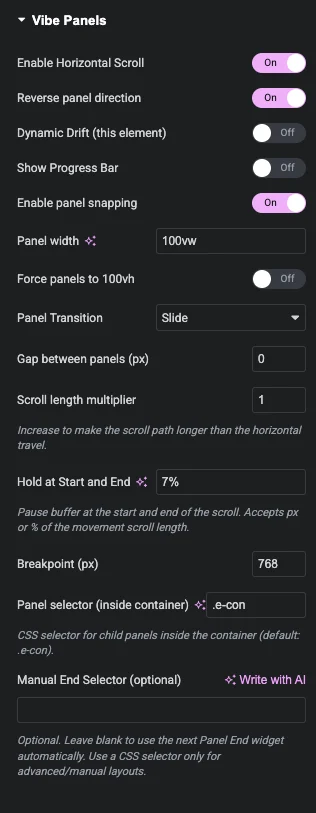
Toggle Vibe Panels on, choose your settings, and define where the scroll begins and ends.
Step 2 - Design Normally
Build your layout using Elementor Containers just like any other section.
Step 3 – Scroll to Reveal
Vertical scroll now drives horizontal motion, with smooth pacing and full control.
Supercharge your content
CONTROL PACING, NOT ANIMATION
Turn long pages into paced experiences. Vibe Panels lets you guide attention, reveal content progressively, and shape how stories unfold as users scroll.
This entire section is a single, continuous sequence — driven by scroll, not scripts.
Fast by design.
Lightweight but packed with punch
Vibe Panels is intentionally lean. No heavy animation libraries, no bloated assets, and no unnecessary overhead. It stays fast, predictable, and plays nicely with modern themes and plugins.
SMOOTH MOTION. MINIMAL FOOTPRINT. MAXIMUM CONTROL.
Vibe Panels for Elementor
Who is this for?
Design panels exactly as you would any other Elementor section. Use containers, widgets, background media, and motion effects the same way you always have. Vibe Panels simply changes how scroll is interpreted.
Web Designers
Build premium experiences without reinventing your workflow.-
Design visually, not procedurally
-
Client-safe layouts
-
Multiple panel sequences per page
-
No JavaScript workflows
-
Production-ready performance
Brand Owners
Powerful effects without technical knowledge.-
Works inside Elementor
-
No code, no setup headaches
-
Content stays familiar
-
Easy to update later
-
Professional results, instantly
Not a slider. Not an animation builder.
Vibe Panels turns scroll into structure using the tools you already understand.
More details:
Are you ready for Vibe Panels?
Download Vibe Panels and go live within minutes.
Fair, Fixed Pricing
Vibe Panels is available directly via Gumroad with clear, transparent pricing and no hidden tiers.
You pay once for a single-website license, download instantly, and start building right away.
Any discounts or promotions are applied automatically at checkout when available.
Technical Specifications
Minimum Requirements
- WordPress 6.0 or higher
- Elementor / Elementor Pro
- PHP 7.4 or higher (tested up to 8.4)
Compatibility Notes
Works with standard themes using Elementor Containers. No external scripts required. Front-end scroll support respects reduced-motion accessibility preferences.
Browser Support
Latest versions of Chrome, Firefox, Safari, Edge and Chromium-based browsers.
Installation & Activation Guide
Download & Install
What you’ll learn in this video.
- Uploading and activating via WordPress Plugins panel
- Accessing Vibe Panels settings in Elementor
How Vibe Panels Works
'go live' launchpad
What you’ll learn in this video.
- How panels are enabled
- Settings explained
- How panel content stays editable in Elementor
Licensing, Updates & Refunds
Purchasing & Licensing
All purchases are handled securely through Gumroad. Your license grants usage on a single website, with access to the latest available version at the time of purchase.
Refunds
Refunds are handled in accordance with Gumroad’s refund policy.
If you have questions about a purchase or believe a refund may be applicable, you can submit a request directly through your Gumroad account.
Support Policy
Support is provided directly by the developer and covers installation questions, usage guidance, and verified issues related to Vibe Panels.
Support availability and response times are outlined clearly at the point of purchase on Gumroad.
Terms & Conditions
By purchasing Vibe Panels, you agree to the usage terms outlined on the Gumroad product download page, including licensing scope and permitted use.